Annual VAT return
The data of your annual VAT return from Getbeel's VAT registers, the LIPE checked against the official schema, and what you or your accountant still do.
Getbeel prepares the data of the annual VAT return (dichiarazione IVA) from the VAT registers and the settlements saved during the year. It does not prepare the file to send: you or your accountant copy the lines, check them and send.
Before you start
- The year's settlements saved in Taxes → VAT settlements. Line VL30 counts only those and the VAT F24s marked as paid in Getbeel (Taxes).
- Last year's VAT credit, if any: the credit from the previous return (VX5) minus what you already offset with F24.
- No need for the Agenzia's software to prepare the data: you need it later, to fill in and send.
- Cost: preparing the data is free; it is charged once, when you record it as filed (Pricing).
Steps
Open the deadline
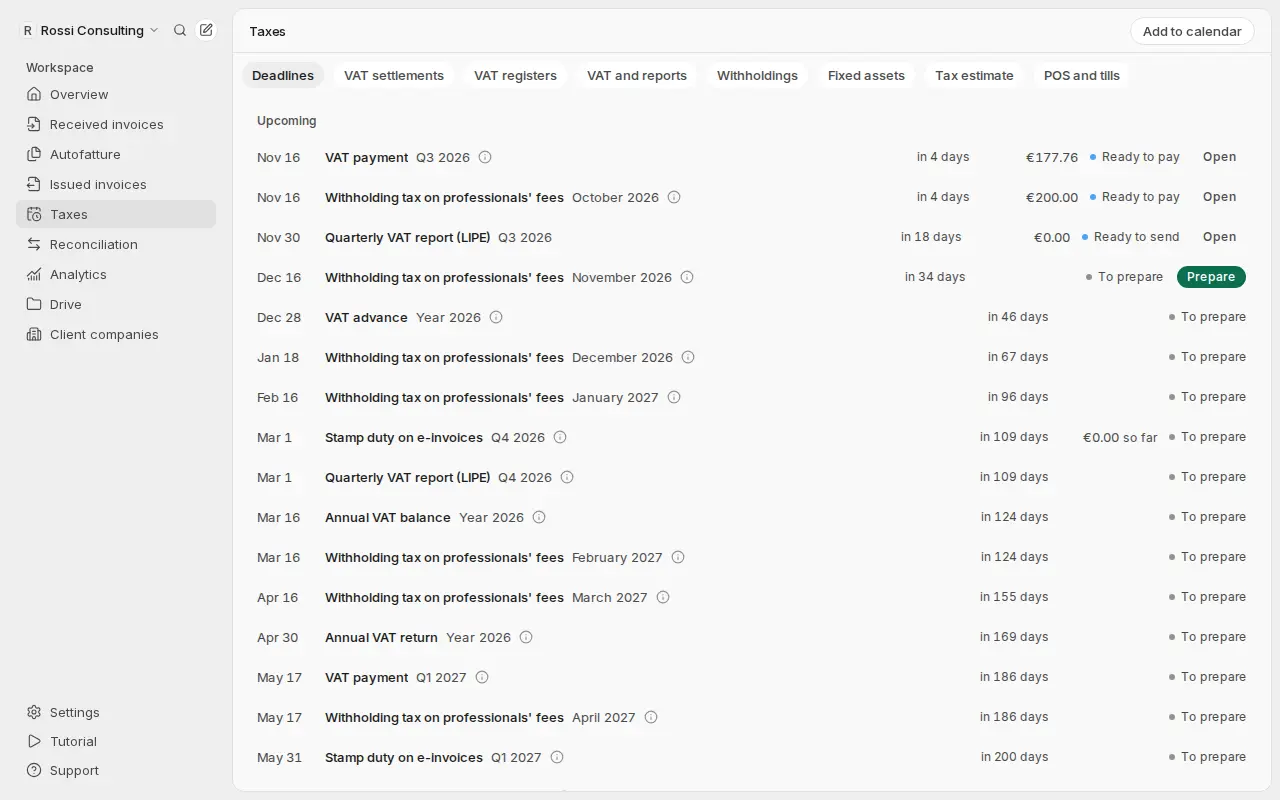
From 1 January, open Taxes → Deadlines and find Annual VAT return. Choose Prepare the data.
Enter the previous year's credit
In the field Previous year's VAT credit still available (optional), enter the credit or leave it empty. It goes in line VL25. Then choose Prepare the data.
Check the flagged points
At the top you find the points to check. For example: documents not yet in the registers, transactions without a clear line, domestic reverse charge (TD16), foreign suppliers without an autofattura, non-deductible VAT, unsaved settlements.
Review the lines
Below you find the lines of sections VE, VF, VJ, VL and VX, in whole euros. Each line has the field code from the technical specifications. Further down you see the year's settlements: how much was due and how much was paid.
Download the data
Choose Download Excel, Download CSV or Download JSON. Send the file to your accountant, or copy the lines into the Agenzia's free "Software di compilazione Iva".
Upload the receipt
After sending, upload the Agenzia's receipt under Did you file the VAT return?. The deadline shows as filed.
What just happened
- The data is ready from the VAT registers and saved settlements, not from manual entry.
- The points to check tell you what Getbeel could not know.
- The downloaded file is a summary to copy, not the electronic filing.
- The deadline is closed with the receipt kept in Getbeel.
What is left to do outside Getbeel
- Fill in the parts Getbeel does not know: front page, signatures, sections VA, VC, VO, VT and the others.
- Check and send with the Agenzia's checking procedure, from Fisconline, Entratel or an intermediary. The window runs from 1 February to 30 April (art. 8, c. 1, DPR 322/1998).
- Pay any balance (VX1) with F24, tax code 6099, by 16 March (IVA 2026 instructions).
- To offset a credit above €5,000 in F24 you need a professional's visto di conformità (compliance stamp) (art. 10, c. 1, lett. a), n. 7, DL 78/2009).
Which model
The lines follow the latest published model: IVA 2026, tax year 2025, approved by AdE provv. prot. 51732 of 15 January 2026. The model for tax year 2026 is not out yet. Getbeel flags this in the summary: check it again when the new one is out.
The LIPE
Getbeel checks the quarterly LIPE file against the official schema (IVP18) as soon as it creates it. The Agenzia's checking software is a desktop program: you run it, Getbeel cannot.
If it fails
| Message | Cause | Fix |
|---|---|---|
| "Settlement not saved" next to a period | That month or quarter is not saved, so VL30 does not count it | Save it in Taxes → VAT settlements, then choose Compute again |
| "Changed invoices or settlements? Prepare the data again." | A document or settlement changed after you prepared the data | Choose Compute again |
| "The return model for … is not published yet" | The Agenzia has not published the new model yet | Use the data and check it again when the model is out |
| "Some checks of the technical specifications fail" | An internal Getbeel check does not add up | Report it to Getbeel support and do not copy those lines |
| "Preparing filings needs an active plan." | The account has no plan | Choose a plan in Settings → Usage & billing |
Sources
- IVA 2026 model and instructions, AdE provv. prot. 51732 of 15 January 2026; technical specifications, provv. prot. 50925 of 11 February 2026.
- Filing deadlines: art. 8, c. 1, DPR 322/1998.
- Visto di conformità: art. 10, c. 1, lett. a), n. 7, DL 78/2009, as amended by art. 3 DL 50/2017.
Next steps
Taxes
Deadlines, VAT registers and settlements kept up to date from your invoices. Getbeel prepares the F24; you check and pay.
Withholding tax (ritenute)
Invoices with ritenuta and cassa previdenziale, withholdings to pay when you pay a professional, F24 code 1040 and data for the Certificazione Unica.