Taxes
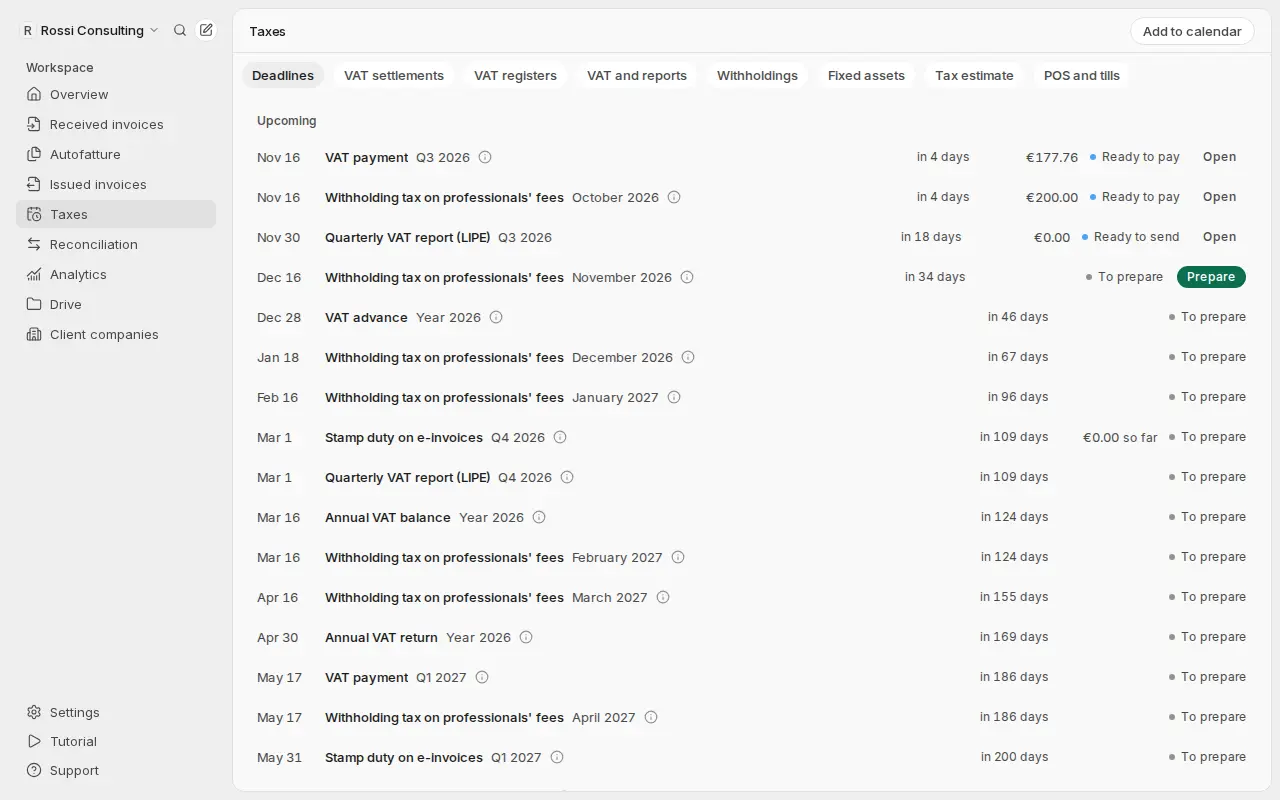
Deadlines, VAT registers and settlements kept up to date from your invoices. Getbeel prepares the F24; you check and pay.
Taxes keeps deadlines, VAT registers and VAT settlements (liquidazione IVA) up to date from the documents in Getbeel. You check the flagged rows, prepare the F24 payment form when you are ready, and pay it yourself.
Before you start
- Your tax settings, once. In Taxes → Deadlines, answer How do you pay VAT? and the question about professionals paid with a withholding. Getbeel builds the deadlines from these.
- Your documents in Getbeel: issued invoices, supplier invoices (from SDI, from email or uploaded) and autofatture (self-billed invoices). Getbeel counts only what is in Getbeel.
- No need to fill in the registers by hand. Getbeel does not ask for your Agenzia delle Entrate credentials and does not pay for you.
- Cost: preparing the F24 and the LIPE is free; each filing is charged once, when it is paid or filed (Pricing).
What Getbeel updates on its own
- VAT registers. Getbeel computes them from the documents each time you open them. A supplier invoice read by the AI but not yet reviewed goes in at once, flagged Not reviewed yet.
- VAT settlements. They are also recomputed from the registers each time you open them: output VAT, deductible VAT and the result.
- Carry-over from the previous period. The credit (line VP8) or the debt up to €100 (line VP7) comes from the saved settlement. If you did not save it, Getbeel computes it from its registers. An amount you enter replaces the computed one.
- Deadlines. The VAT payment shows the computed amount, followed by so far, until you save the settlement. Stamp duty (bollo) and withholdings do the same until the period is closed.
At the top of VAT registers and VAT settlements you read Updated at with the time of the calculation and how many rows need checking.
Getbeel does not prepare the F24 and the LIPE on its own: they stay To prepare until you prepare them.
Steps
Check the rows to review
Open Taxes → VAT registers and pick the period. Rows marked Not reviewed yet lose that flag when you review the invoice in Received invoices.
If a purchase is not deductible, or only partly, choose Edit on the row. Then Exclude from the settlement or Enter the VAT that counts, always with a reason. For a purchase with non-deductible VAT, enter 0.
Check the settlement
Open Taxes → VAT settlements and pick the period. The lines are the same as in the LIPE.
The fields Previous period's credit and Debt up to €100 not paid are already filled in by Getbeel. Change them only if your accountant gives you a different amount.
Save the settlement
Once the period is closed, choose Save and prepare the F24. If there is something to pay, Getbeel prepares the F24; otherwise you see Settlement saved: nothing to pay now.
Pay the F24
Choose Open the F24. Use Download the F24 reminder (PDF) or copy the values with Copy. Pay from F24 web or from your bank.
Upload the receipt
On the same page, choose I paid: upload the receipt (PDF, PNG or JPEG up to 10 MB). The deadline becomes Paid.
Prepare the quarter's LIPE
Once the quarter is closed and all its settlements are saved, choose Prepare the LIPE file in Taxes → VAT settlements. The LIPE is the quarterly report of VAT settlements. For a company, enter Tax code of the signer and Role.
Send the LIPE
Choose Open the LIPE and Download the LIPE file (XML). Check it with the Agenzia's software, then upload it to Fatture e Corrispettivi, or give it to your accountant. Finally, upload the receipt under Did you send the LIPE?.
What just happened
- The registers were already complete: you checked only the rows Getbeel was unsure about.
- The settlement is saved with its amounts, which feed the next settlement and the LIPE.
- The F24 is ready, with the values to copy and the PDF reminder.
- The deadline is paid, with the receipt kept in Getbeel.
- The LIPE is ready from the saved settlements, already checked against the official IVP18 schema.
If it fails
| Message | Cause | Fix |
|---|---|---|
| "Answer two questions to see all your deadlines." | The tax settings are missing | Answer the two questions in Taxes → Deadlines |
| "No data for the previous period in Getbeel: enter any credit or debt carried." | It is the first period of the year with data in Getbeel | Enter the credit or debt from the previous settlement |
| "The registers changed since you saved this settlement: save it again." | A document of the period changed after you saved | Save the settlement again before paying |
| "Being read by the AI" or "Euro amounts missing" in VAT registers | The document has no amounts yet, or none in euros | Wait for the reading; for foreign currency, fill in the euro amounts |
| "Save the settlements of the quarter first." | A saved settlement is missing for the LIPE | Save each month, or the quarter, in Taxes → VAT settlements |
| "Preparing filings needs an active plan." | The account has no plan | Choose a plan in Settings → Usage & billing |
Getbeel prepares; you and your accountant check before paying or sending.
Sources
- Monthly payment by the 16th and debt up to €100 carried forward: art. 1, c. 1 and 4, DPR 100/1998.
- Quarterly payment with 1% interest: art. 7 DPR 542/1999.
- Lines VP7, VP8 and the LIPE: model and technical specifications IVP18 approved by AdE provv. prot. 125654 of 14 March 2024 (Liquidazioni periodiche IVA).
Next steps
Free conservazione by the Agenzia delle Entrate
E-invoices must be preserved to legal standards. The Agenzia delle Entrate offers a free service: here is how to switch it on.
Annual VAT return
The data of your annual VAT return from Getbeel's VAT registers, the LIPE checked against the official schema, and what you or your accountant still do.