Autofatture
Purchases from foreign suppliers, from the bank statement to the self-invoice sent to SDI.
When you buy from a foreign supplier, for example a software subscription, you account for the VAT with an autofattura (self-invoice) and send it to SDI. Getbeel finds these purchases in your bank movements and prepares the XML.
Which document type
Getbeel suggests the document type for each purchase. You check it before sending.
| Code | Official description | Example |
|---|---|---|
TD17 | Integrazione/autofattura per acquisto servizi dall'estero | SaaS subscription, online advertising |
TD18 | Integrazione per acquisto di beni intracomunitari | Goods bought from an EU supplier |
TD19 | Integrazione/autofattura per acquisto di beni ex art. 17 c. 2 DPR 633/72 | Goods already in Italy sold by a foreign supplier |
Source: Agenzia delle Entrate, FatturaPA technical specifications, Allegato A, version 1.9.1, and Guida alla compilazione delle fatture elettroniche e dell'esterometro, version 1.10 (April 2025). All codes: Tipo documento.
Foreign invoices you receive become proposals
When an invoice from a foreign supplier reaches Getbeel through the email scan, the forwarding address or an upload, Getbeel proposes the autofattura on its own. This applies to Italian companies, and only to invoices that do not come through SDI.
- The rule decides the document type, not the AI. Services from a foreign supplier (for example Vercel, Cloudflare, OpenRouter, Supabase, Resend in the United States, Trigger.dev in the United Kingdom):
TD17. Goods shipped from another EU country:TD18. Goods already in Italy:TD19. Goods imported from outside the EU go through customs: no TD, no proposal. - The XML is generated as a draft. Sending it to SDI is always your action.
- One autofattura per purchase. If the purchase already has one from a bank payment matched to the invoice, or the same invoice (supplier and number) was already proposed or imported, Getbeel does not create another. The Import sources import also skips an invoice that already has one.
- Your changes stay. If you delete a proposal or edit it (for example you set the country), Getbeel never brings it back or overwrites it when the invoice is saved again. Deleting the received invoice deletes its proposal if it was not sent to SDI; one already sent stays and is marked.
- The exchange rate is the one of the invoice date (art. 13, c. 4, DPR 633/72).
- The date of the purchase (non-EU suppliers) is taken from the invoice date. By law a service takes place when it is completed or, if periodic, when the fee falls due, or earlier when you pay it earlier (art. 6, c. 6, DPR 633/72): if it differs, correct the Data in the details.
Some proposals are listed to check and are not generated on their own: unknown supplier country (Country missing: enter it in IdPaese), goods or services unclear, VAT charged by the supplier, only a payment notice, deadline already passed, possible duplicate of a bank payment, date of receipt unknown (EU suppliers: the deadline is then counted from the invoice date), supplier in Northern Ireland. When the supplier's tax ID is missing the XML uses OO99999999999: a common convention, but not written in the Agenzia's guide or specifications, so the row is flagged to check.
When to send it
By the 15th of the following month (art. 1, c. 3-bis, lett. b, d.lgs. 127/2015):
| Supplier | The month that counts | Autofattura date (Data) |
|---|---|---|
| EU (integrazione), Northern Ireland goods | receipt of the invoice | date of receipt, or a date in the same month |
| Non-EU, San Marino (services), Vatican | the purchase (effettuazione) | date of the purchase |
The date of receipt is the date of the email for the email scan and the forwarding address, and the invoice date for an upload (the earliest it can be).
Northern Ireland (XI). Under the Windsor Framework EU VAT rules still apply to goods in Northern Ireland: goods from an XI supplier are an intra-EU purchase (TD18), services follow the UK (TD17). Whether SDI accepts XI as IdPaese is not confirmed, so these proposals are always to check.
Getbeel shows the deadline in the list (Send by …), always the 15th, without moving it when it falls on a Saturday or a public holiday.
In the VAT registers a foreign purchase received since these proposals exist, with no autofattura sent, is listed as missing. It counts as covered by any autofattura sent for the same supplier with the same invoice number, or with a close amount in the same or the next month, even when it is not matched to the invoice. Older purchases are never listed, so closed periods do not change. and a foreign invoice whose country is unknown is not counted as Italian: its VAT is not deducted.
Sources: AdE, Guida alla compilazione delle fatture elettroniche e dell'esterometro v1.10 (1 April 2025), sections TD17, TD18, TD19; Specifiche tecniche Allegato A v1.9.1 (checks 00473 and 00475); DPR 633/72 arts. 7-ter, 13, 17 c. 2, 21 c. 4 lett. d, 6 c. 6; DL 331/93 arts. 46 and 47; Ris. 89/E/2010; Circ. 26/E/2022; Northern Ireland: Windsor Framework (Protocol on Ireland/Northern Ireland, art. 8) and the European Commission's guidance on the GB and XI codes. From 1 January 2027 the Testo unico IVA (D.Lgs. 10/2026) renumbers the articles: art. 17 → 64, 7-ter → 17, 13 → 27, 21 → 72, DL 331/93 art. 46 → 97, art. 47 → 98, d.lgs. 127/2015 art. 1 c. 3-bis → art. 77 c. 4.
Before you start
- An Italian company: Autofatture appears in the sidebar only for Italian companies.
- Complete tax details in Settings → Company: the autofattura carries your details as the buyer (cessionario).
- Bank movements in Reconciliation, from a bank statement or a connected bank. Alternatively, import invoices or a CSV of foreign suppliers.
- The SDI add-on turned on. Each autofattura you send counts as one SDI send (Pricing).
Steps
Bring foreign payments into Autofatture
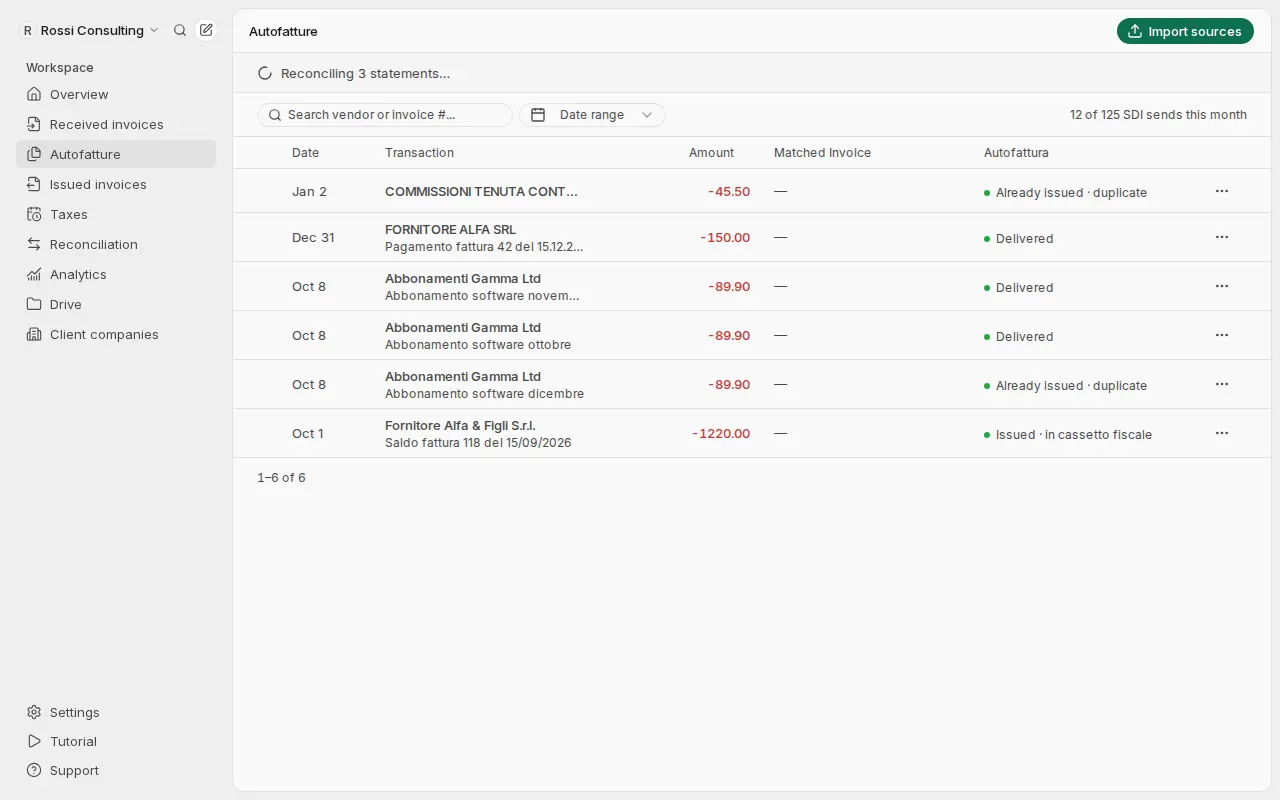
Movements from the statements in Reconciliation arrive on their own. For other sources press Import sources and choose Bank statement, Single invoice or Foreign providers CSV.
Generate the autofatture
Select the rows and press Generate, or press Create on a single row. Getbeel fills in the supplier, country, amount and document type.
Check the data
Open the row with Details. Correct it with Edit details, then press Regenerate XML to apply the changes.
Send to SDI
On the detail page press Send to SDI, or select several rows and press Send to SDI. Follow the status as for issued invoices.
What just happened
- Foreign payments became rows to self-invoice, one per movement.
- The XML was generated with the document type, natura and legal reference.
- Your checks are in the XML: each change applies after Regenerate XML.
- The autofattura is at SDI. The status updates on its own: Delivered, Issued · in cassetto fiscale, Rejected or Already issued · duplicate.
You cannot delete an autofattura already sent to SDI: Delete skips it.
If it fails
| Message | Cause | Fix |
|---|---|---|
| "No foreign-provider transactions to generate from this bank statement." | The statement has no payments to foreign suppliers | Choose another statement or import the invoices |
| SDI add-on required | The account has no SDI add-on | Open Settings → Usage & billing |
| "SDI would reject this XML: nothing was sent. …" | A field fails the SDI checks | Correct it with Edit details or regenerate the XML, then send it again |
| "IdDocumento must be a 1-20 character supplier reference, not a transaction ID." | The reference to the supplier's invoice is not valid | Enter the supplier's invoice number |
| Issued · in cassetto fiscale | SDI could not deliver it to you | It is issued: do not resend it. Register your codice destinatario |
| Country missing | The supplier's country is unknown | Open Details, enter the country code in IdPaese (e.g. US, IE) and press Create |
| "TD18 is only for goods from another EU country. …" | TD18 chosen for a supplier outside the EU | Use TD17 (services) or TD19 (goods already in Italy); imported goods need no autofattura |